



























Refresh Your Instagram Feed: Without a New Profile

Ever Wonder Why Your Feed Changes?
Instagram isn’t reading your mind, it’s watching your behavior. Every time you like a post, watch a Reel all the way through, pause on a video, follow an account “just because it looked interesting,” Instagram quietly takes notes. Over time, all those tiny actions pile up. That’s how you end up with: ● Content you watched once but don’t care about anymore ● Accounts you followed years ago that no longer match your life ● A feed that feels noisy instead of inspiring Life changes. Interests change. But your feed doesn’t automatically keep up. That’s where the reset comes in.Hidden Instagram Hack: Secret Fresh Start Button!
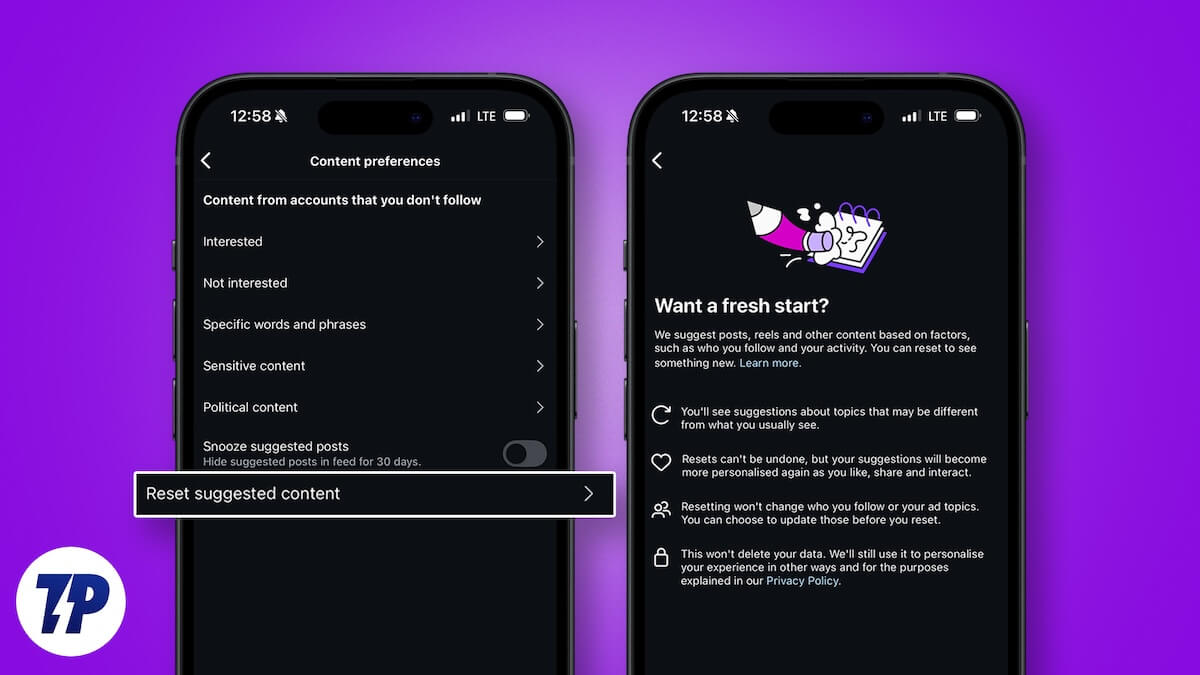
Instagram now has a feature that lets you reset your suggested content, meaning the posts, Reels, and Explore recommendations you see. This doesn’t delete your account. It doesn’t unfollow people for you or erase your data. Think of it like telling Instagram: “Hey… let’s start over with recommendations.”Step By Step Reset Your Instagram
Open Instagram and go to your profile — tap your photo in the corner. From there: ● Open Settings ● Scroll down to Content Preferences ● Look for Reset Suggested Content Instagram will show you a message explaining what happens next, it says: ● You’ll start seeing different topics ● Your feed will personalize again as you like and interact ● The reset can’t be undone (but your feed will evolve naturally again) Tap Next, confirm the reset, and that’s it. No drama. No tech headache.What Happens After You Reset?
At first, your feed might feel a little random. That’s normal. Instagram is learning you again. This is your chance to teach it properly: ● Like posts you actually enjoy ● Watch videos you want more of ● Ignore or scroll past what you don’t care about Within a few days, your feed starts to feel calmer, more relevant, and more “you.” People often notice fewer clickbait posts, fewer things they accidentally trained the algorithm on years ago, and more content that fits their current life.One Extra Step That Helps
If your feed still feels off after resetting, there’s one more thing you can do: unfollow accounts you no longer care about. We’ve all followed people impulsively, a funny video here, a random page there. Over time, those follows add up and confuse the algorithm. Cleaning up your following list + resetting suggested content = a much better experience.Why This Is Important
Your Instagram feed affects more than just your screen time. It affects your mood, your creativity, and your focus. A cleaner feed means less noise, less stress, and more content that actually adds value to your day. And if you’re a creator or business, this matters even more, because Instagram rewards people who interact intentionally, not mindlessly.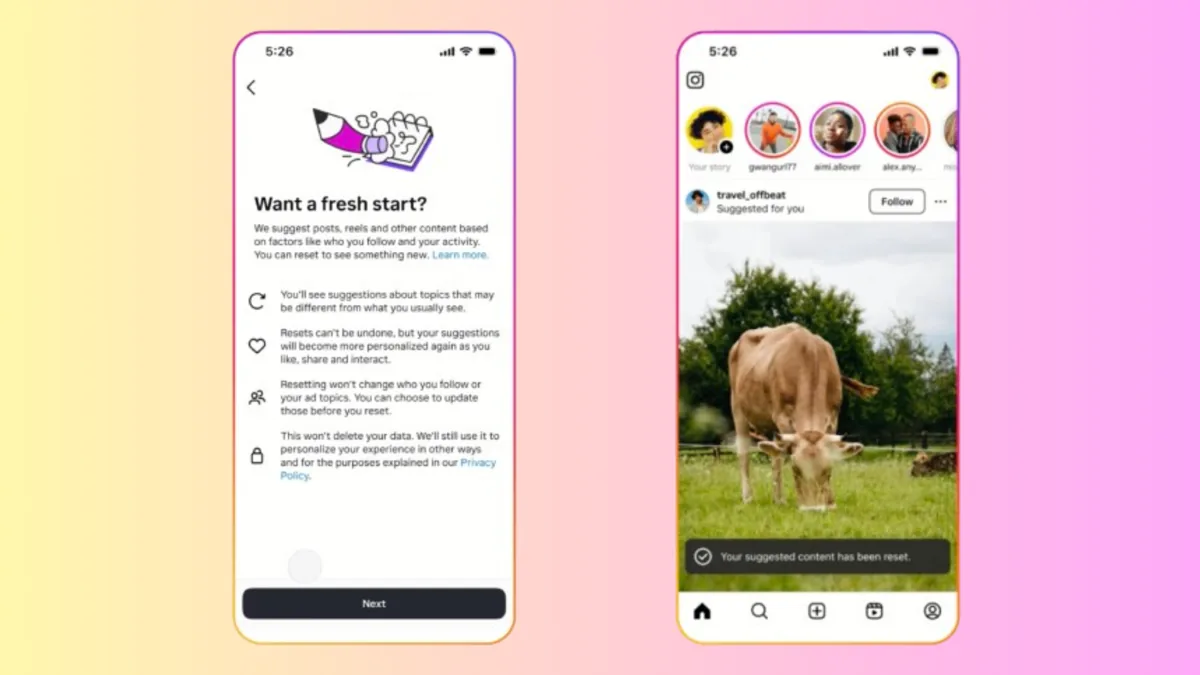 Key Takeaways
Instagram isn’t broken, it’s just reacting to old signals.
Resetting your feed is like rearranging your digital space so it fits who you are now, not who you were three years ago. Sometimes growth doesn’t start with posting more. Sometimes it starts with hitting reset.
Related Posts

Instagram: Can Instagram’s First Draft Make Reel Editing Faster?
Fatima Shahid | September 11, 2026
Instagram Has a New Look — But Does It Really Matter to Creators?
Amina Omar | September 3, 2026
Can Instagram’s New AI Rules Accidentally Hurt Real Creators?
Fatima Shahid | September 3, 2026
Why Creators Should Stop Judging YouTube Success by Views Alone
Amina Omar | August 31, 2026
Instagram Says Captions Matter More Than Creators Think
Sarah Sumbal | August 31, 2026